{date} {type} {area}
; }; [Set up the MCP Connector](/developer-docs/mcp/setup)
## At a glance
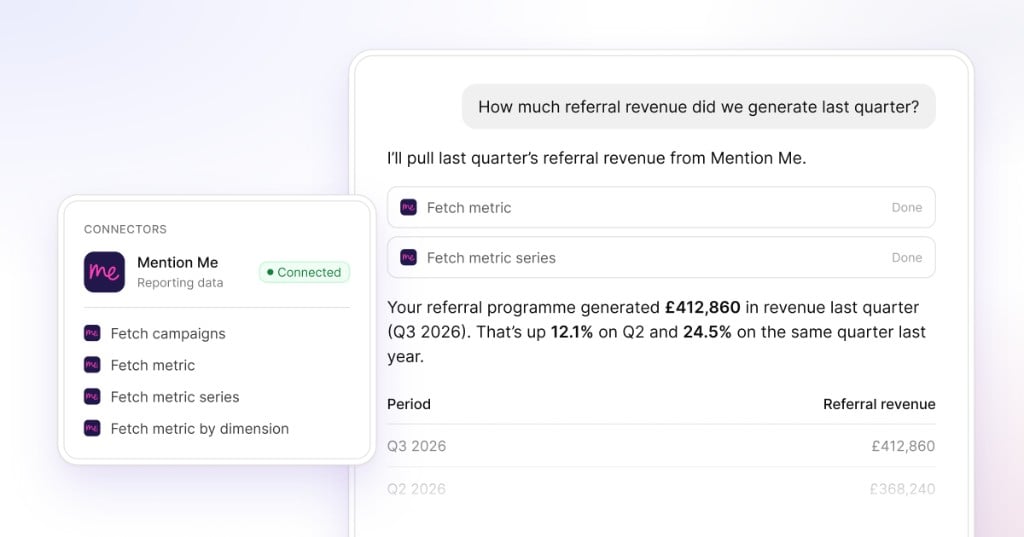
* Connect Mention Me to Claude, ChatGPT or another MCP-compatible AI tool
* Ask questions about referral performance in your own words
* Check referral volumes, conversion trends and revenue contribution
* Compare performance across different periods
* Use a read-only connection with aggregate reporting data and no customer PII
Referral performance questions come up in leadership meetings, channel reviews and campaign discussions, from revenue contribution and year-on-year comparisons to changes in conversion after a campaign update.
The connector gives stakeholders direct access to these answers without needing to log in to the platform.
## How it works
* **Connect Mention Me once.** Follow the [setup journey](/developer-docs/mcp/setup) and add Mention Me to a supported AI tool.
* **Ask a performance question.** Ask a clear question in your own words, including the metric and time period you are interested in.
* **The connector retrieves the relevant figures.** It uses aggregate Mention Me reporting data to answer the question.
* **Continue the conversation.** Ask a follow-up, change the date range or request a comparison without starting again.
Setup takes just a few minutes.
## Questions you can ask today
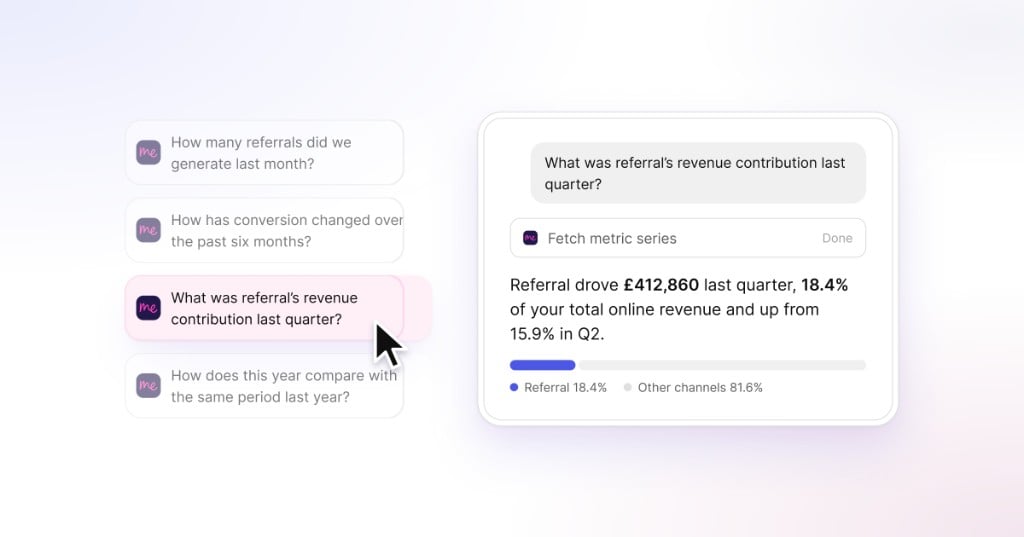
The connector can answer questions such as:
* How many referrals did we generate last month?
* How has conversion changed over the past six months?
* What was referral's revenue contribution last quarter?
* How does this year compare with the same period last year?
It is designed for senior stakeholders who need referral performance insight, including marketing directors and heads of acquisition, commerce, CRM or referral.
[Set up the MCP Connector](/developer-docs/mcp/setup)
## At a glance
* Connect Mention Me to Claude, ChatGPT or another MCP-compatible AI tool
* Ask questions about referral performance in your own words
* Check referral volumes, conversion trends and revenue contribution
* Compare performance across different periods
* Use a read-only connection with aggregate reporting data and no customer PII
Referral performance questions come up in leadership meetings, channel reviews and campaign discussions, from revenue contribution and year-on-year comparisons to changes in conversion after a campaign update.
The connector gives stakeholders direct access to these answers without needing to log in to the platform.
## How it works
* **Connect Mention Me once.** Follow the [setup journey](/developer-docs/mcp/setup) and add Mention Me to a supported AI tool.
* **Ask a performance question.** Ask a clear question in your own words, including the metric and time period you are interested in.
* **The connector retrieves the relevant figures.** It uses aggregate Mention Me reporting data to answer the question.
* **Continue the conversation.** Ask a follow-up, change the date range or request a comparison without starting again.
Setup takes just a few minutes.
## Questions you can ask today
The connector can answer questions such as:
* How many referrals did we generate last month?
* How has conversion changed over the past six months?
* What was referral's revenue contribution last quarter?
* How does this year compare with the same period last year?
It is designed for senior stakeholders who need referral performance insight, including marketing directors and heads of acquisition, commerce, CRM or referral.
 ## Read-only by design
The MCP Connector accesses aggregate reporting data only. It does not access customer personally identifiable information and cannot change campaigns, programmes or settings.
The connector is designed for understanding performance, while campaign and account management stay within Mention Me.
## Reporting answers, not campaign actions
This first release focuses on reporting questions. Benchmarking, campaign recommendations and in-platform actions are not included at this stage, and programme management continues in Mention Me.
## Faster access for senior stakeholders
The connector is designed for stakeholders who need referral results but do not use Mention Me every day. It supports board reporting, trend checks and review preparation without a separate data request.
Daily users can continue working in Mention Me, while other stakeholders gain an additional route to the same reporting data.
## From setup to the first answer in minutes
## Connect it, ask a question, check the source
See how to connect Mention Me, ask your first question and check the reporting data being used.
The MCP Connector went live in June 2026. It works with Claude, ChatGPT, Claude Code, Cursor, VS Code, Windsurf and other tools that support MCP connectors.
## Read-only by design
The MCP Connector accesses aggregate reporting data only. It does not access customer personally identifiable information and cannot change campaigns, programmes or settings.
The connector is designed for understanding performance, while campaign and account management stay within Mention Me.
## Reporting answers, not campaign actions
This first release focuses on reporting questions. Benchmarking, campaign recommendations and in-platform actions are not included at this stage, and programme management continues in Mention Me.
## Faster access for senior stakeholders
The connector is designed for stakeholders who need referral results but do not use Mention Me every day. It supports board reporting, trend checks and review preparation without a separate data request.
Daily users can continue working in Mention Me, while other stakeholders gain an additional route to the same reporting data.
## From setup to the first answer in minutes
## Connect it, ask a question, check the source
See how to connect Mention Me, ask your first question and check the reporting data being used.
The MCP Connector went live in June 2026. It works with Claude, ChatGPT, Claude Code, Cursor, VS Code, Windsurf and other tools that support MCP connectors.