> ## Documentation Index
> Fetch the complete documentation index at: https://docs.mention-me.com/llms.txt
> Use this file to discover all available pages before exploring further.

# Disable or delete a webhook connection

> If a webhook connection is no longer required, you can either disable it (to pause message delivery) or delete it permanently from your account.

## Disable a webhook

<Steps>
  <Step title="Go to Connections Hub → Webhooks">
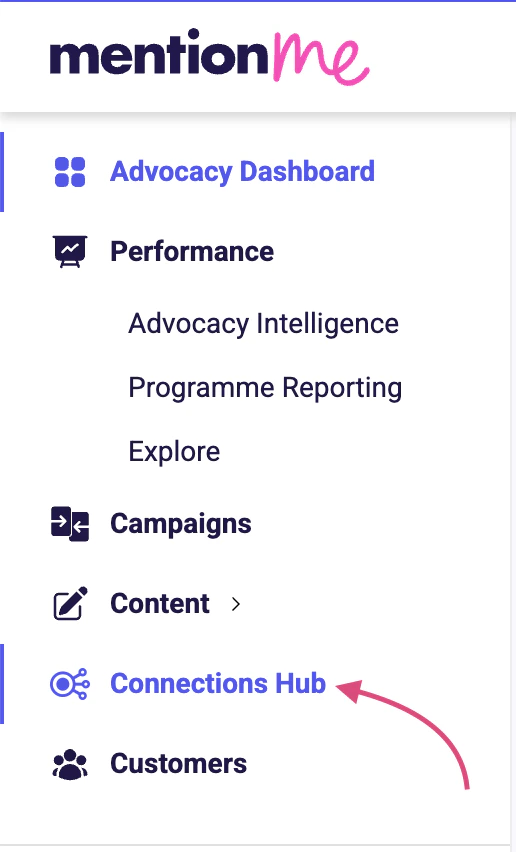
    Navigate to:

    **Connections Hub → Webhooks**
    <img src="https://mintcdn.com/mentionme/Dcv4Ct-ZIyuK4Pcd/images/developer-docs/e6b51552a42459956d856a2d88e0169da6b167991f2a4f6736b6f2f79a55a316-Screenshot_2025-10-08_at_13.29.58.png?fit=max&auto=format&n=Dcv4Ct-ZIyuK4Pcd&q=85&s=2b84bfdad7238a34ddecd78c81c8e27a" alt="" width="516" height="852" data-path="images/developer-docs/e6b51552a42459956d856a2d88e0169da6b167991f2a4f6736b6f2f79a55a316-Screenshot_2025-10-08_at_13.29.58.png" />
  </Step>

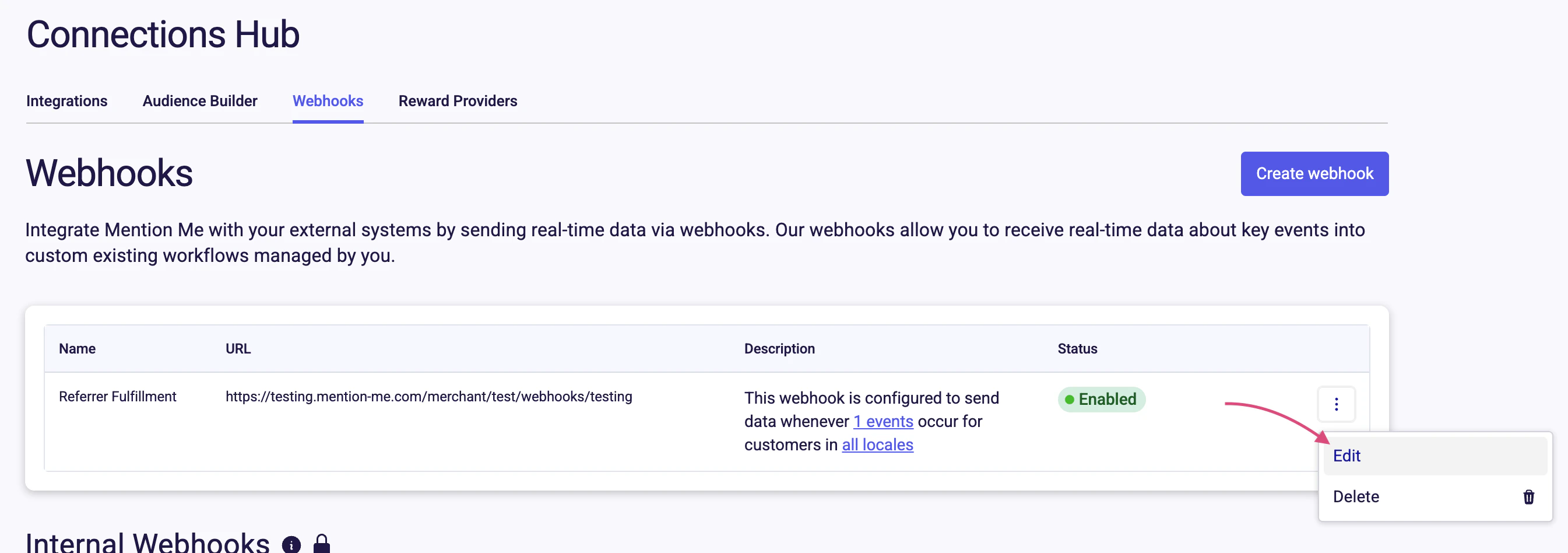
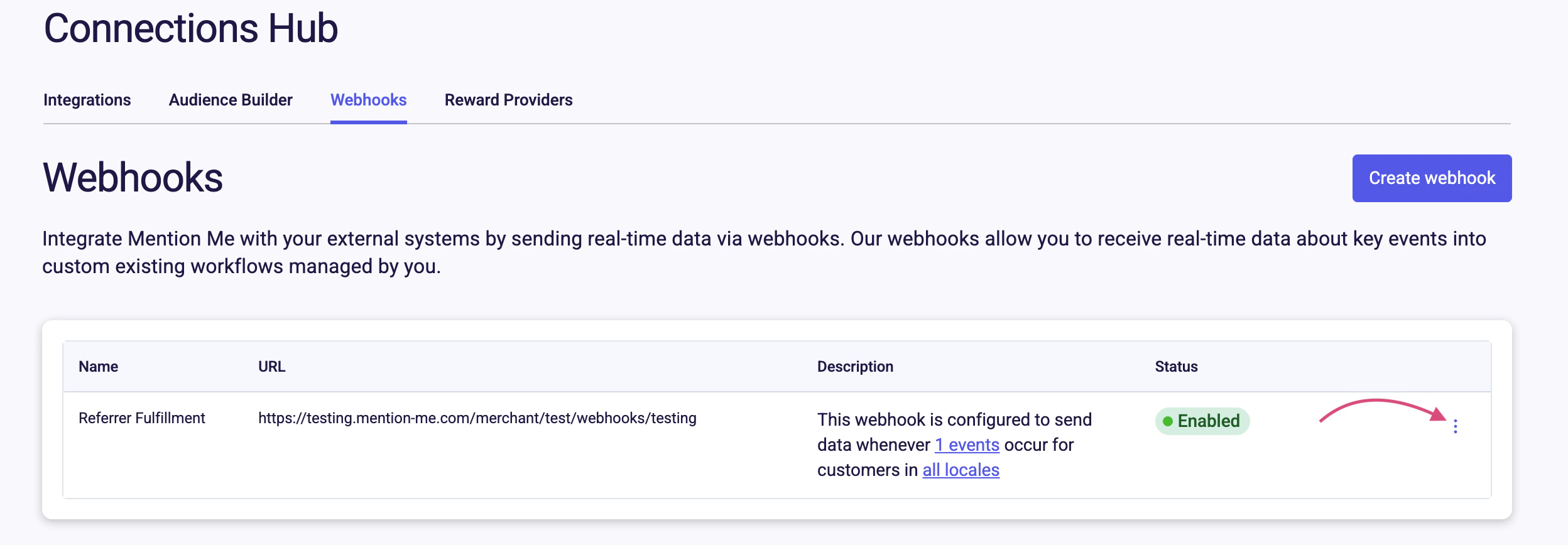
  <Step title="Open the menu and select Edit">
    Find the webhook you want to update. Click the **⋮** menu, then choose Edit.
    <img src="https://mintcdn.com/mentionme/Dcv4Ct-ZIyuK4Pcd/images/developer-docs/9b6c5bb76c4c19506196cc51481556e349f6f47d4b3f018540e151218a588442-Screenshot_2025-10-08_at_13.33.19.png?fit=max&auto=format&n=Dcv4Ct-ZIyuK4Pcd&q=85&s=aa6aeb9e8522e437ecc2660e91616b49" alt="" width="2496" height="868" data-path="images/developer-docs/9b6c5bb76c4c19506196cc51481556e349f6f47d4b3f018540e151218a588442-Screenshot_2025-10-08_at_13.33.19.png" />

    <img src="https://mintcdn.com/mentionme/Dcv4Ct-ZIyuK4Pcd/images/developer-docs/cc111bebfcd93176bd60de462e5c54ab0dd24bc0e1b70b2693391f80cf5b3f3e-Screenshot_2025-10-08_at_13.33.54.png?fit=max&auto=format&n=Dcv4Ct-ZIyuK4Pcd&q=85&s=7e284ec6641ea331f1e539ebfd0fea8d" alt="" width="2690" height="948" data-path="images/developer-docs/cc111bebfcd93176bd60de462e5c54ab0dd24bc0e1b70b2693391f80cf5b3f3e-Screenshot_2025-10-08_at_13.33.54.png" />
  </Step>

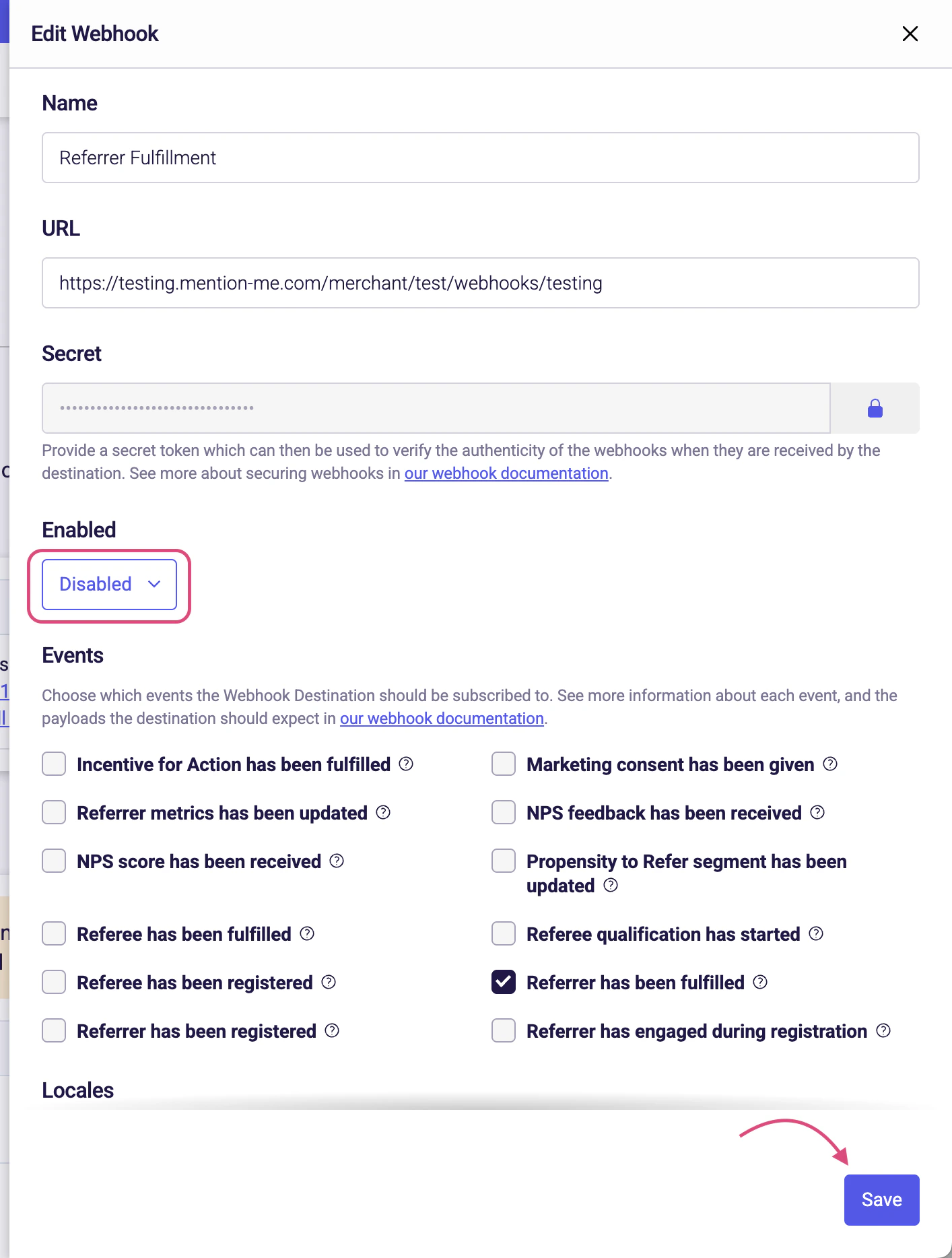
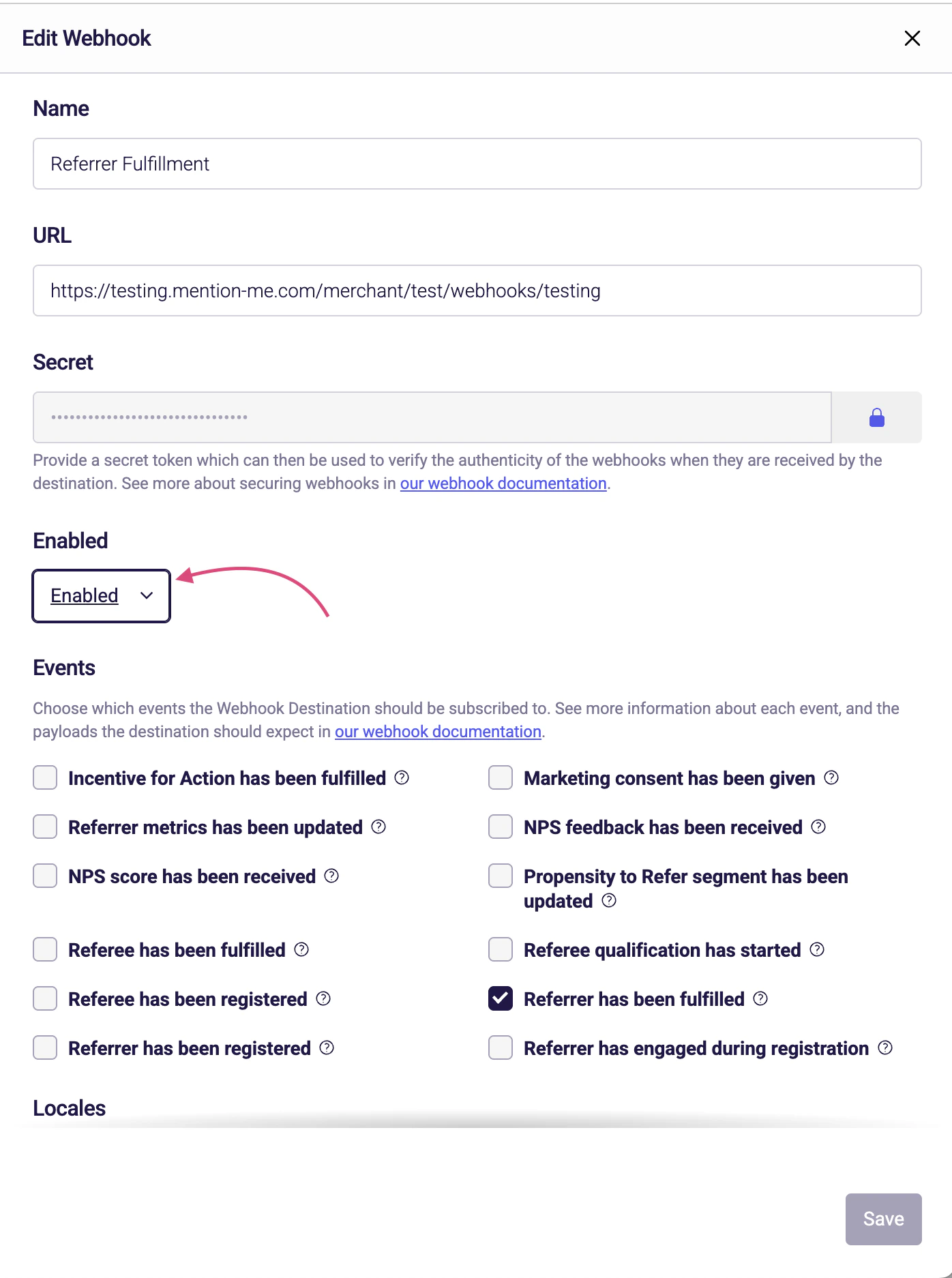
  <Step title="Set the webhook to Disabled">
    In the "Enabled" dropdown, set the value to Disabled, then click Save.
    <img src="https://mintcdn.com/mentionme/Dcv4Ct-ZIyuK4Pcd/images/developer-docs/e9e272eb0dacf772ca9207a178132b75debe30bd61fb3a8ee808ee9a715d3cd9-Screenshot_2025-10-08_at_13.34.27.png?fit=max&auto=format&n=Dcv4Ct-ZIyuK4Pcd&q=85&s=34c0b2aad1fc51510511c538410bd3c8" alt="" width="1396" height="1874" data-path="images/developer-docs/e9e272eb0dacf772ca9207a178132b75debe30bd61fb3a8ee808ee9a715d3cd9-Screenshot_2025-10-08_at_13.34.27.png" />

    <img src="https://mintcdn.com/mentionme/Dcv4Ct-ZIyuK4Pcd/images/developer-docs/b3d6552437f02fa3e6cbe2f8ffb72a5bbac27850dabbdcaef17ccdaa580f6dd2-Screenshot_2025-10-08_at_13.35.00.png?fit=max&auto=format&n=Dcv4Ct-ZIyuK4Pcd&q=85&s=27b063b81ca7a89d10fed06be5f968b4" alt="" width="1414" height="1868" data-path="images/developer-docs/b3d6552437f02fa3e6cbe2f8ffb72a5bbac27850dabbdcaef17ccdaa580f6dd2-Screenshot_2025-10-08_at_13.35.00.png" />
  </Step>

  <Step title="Confirm the webhook is disabled">
    You'll see the updated status in the Webhooks dashboard.

    <img src="https://mintcdn.com/mentionme/Dcv4Ct-ZIyuK4Pcd/images/developer-docs/ac52e58a84475614ce7dfaaf854257b7c227866f643b16df74f330be1c06c968-Screenshot_2025-10-08_at_13.35.53.png?fit=max&auto=format&n=Dcv4Ct-ZIyuK4Pcd&q=85&s=9de5d6bef616fdb0198c455b4e31ad24" alt="" width="2436" height="396" data-path="images/developer-docs/ac52e58a84475614ce7dfaaf854257b7c227866f643b16df74f330be1c06c968-Screenshot_2025-10-08_at_13.35.53.png" />
  </Step>
</Steps>

## Delete a webhook

<Steps>
  <Step title="Locate the webhook">
    From the Webhooks dashboard, locate the webhook you'd like to delete.
  </Step>

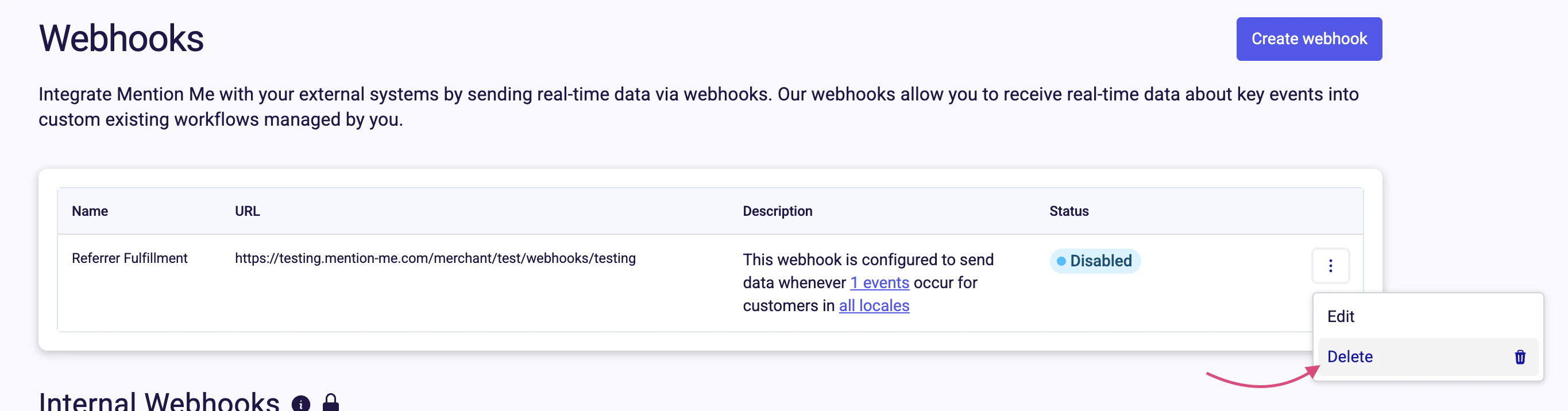
  <Step title="Select Delete from the menu">
    Click the **⋮** menu on the webhook row, then choose Delete.
    <img src="https://mintcdn.com/mentionme/Dcv4Ct-ZIyuK4Pcd/images/developer-docs/a22c917f9cb1162c94f8d037cdb30e8460ec8986f54b3e9dc2ee5b6bc7571b81-Screenshot_2025-10-08_at_13.36.31.png?fit=max&auto=format&n=Dcv4Ct-ZIyuK4Pcd&q=85&s=6ae0702061bfe81177037e8eb247791f" alt="" width="2730" height="716" data-path="images/developer-docs/a22c917f9cb1162c94f8d037cdb30e8460ec8986f54b3e9dc2ee5b6bc7571b81-Screenshot_2025-10-08_at_13.36.31.png" />
  </Step>
</Steps>

## Need support?

Contact your integration lead or raise a support ticket via the Admin Portal if you need help managing webhook connections.