> ## Documentation Index
> Fetch the complete documentation index at: https://docs.mention-me.com/llms.txt
> Use this file to discover all available pages before exploring further.
# Create Destination
> Set up a webhook destination in the Mention Me Connections Hub
### Access
You'll need to have a Mention Me account in order to set up Webhooks. If you don't have access, please contact your account manager.
Webhooks can be created in the Connections Hub (for [Demo](https://demo.mention-me.com/merchant/~/webhooks/view), and [Production](https://mention-me.com/merchant/~/webhooks/view)) per account. Once enabled, this will mean any events which occur in *the account* will be delivered to the Destination of your choosing.
Simply click "Create webhook", and begin setting up the Destination.
 ### Tip
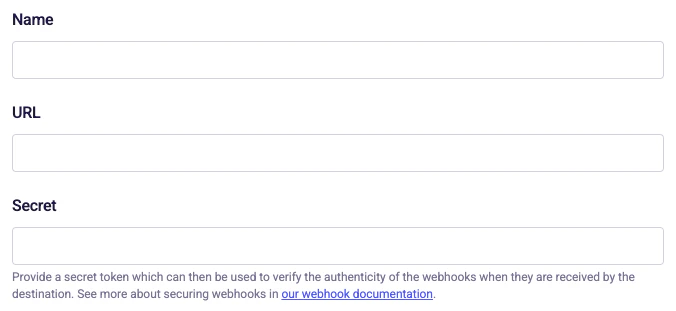
One easy way we recommend to create a secure secret is by using the Terminal. A good command is: `uuidgen | shasum -a 256`
Secrets are the mechanism in which you can ensure the authenticity of a Webhook you receive from us. In other words, the Secret is the security mechanism which ensures that no bad actor is able to send data which looks like a Webhook from Mention Me to your system with malicious intent.
The Secret you choose should be kept confidential and not stored in plaintext, or directly in the code of your external system.
You can read more about how to use the Secret you choose in the [Security section](/api-reference/webhooks/security).
### Tip
One easy way we recommend to create a secure secret is by using the Terminal. A good command is: `uuidgen | shasum -a 256`
Secrets are the mechanism in which you can ensure the authenticity of a Webhook you receive from us. In other words, the Secret is the security mechanism which ensures that no bad actor is able to send data which looks like a Webhook from Mention Me to your system with malicious intent.
The Secret you choose should be kept confidential and not stored in plaintext, or directly in the code of your external system.
You can read more about how to use the Secret you choose in the [Security section](/api-reference/webhooks/security).
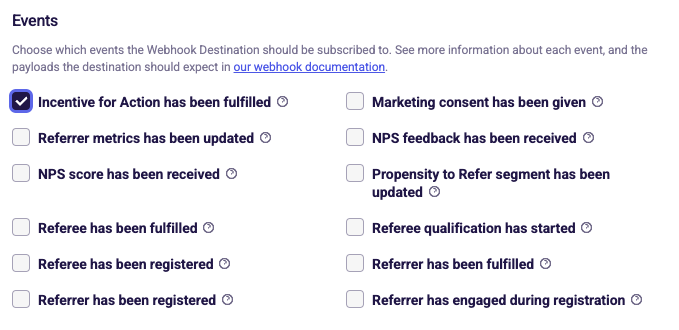 Events are all the types of data your external system can choose to subscribe to receive when they occur for a Customer.
All of the events follow generally the same structure - with parts of the payload changing depending on the event which is being delivered. You can see examples of each payload in the [Events section](/api-reference/webhooks/events).
Once chosen, whenever that event occurs for a Customer in the Mention Me platform, we will, in real-time, deliver a Webhook to you which outlines what happened.
Events are all the types of data your external system can choose to subscribe to receive when they occur for a Customer.
All of the events follow generally the same structure - with parts of the payload changing depending on the event which is being delivered. You can see examples of each payload in the [Events section](/api-reference/webhooks/events).
Once chosen, whenever that event occurs for a Customer in the Mention Me platform, we will, in real-time, deliver a Webhook to you which outlines what happened.
 Locales are how you choose which regions of Customers your external system should be subscribed to receive events from. For example, you may wish to only receive Webhooks for Customers in the UK, and not ones from other regions.
If you leave all Locales unchecked, events from Customers of all regions will be sent to your external system.
## Next steps
Once your destination is created, you can [send a test event](/api-reference/webhooks/test-webhook) to verify your endpoint receives and processes payloads correctly before any real customer activity triggers a delivery.
Locales are how you choose which regions of Customers your external system should be subscribed to receive events from. For example, you may wish to only receive Webhooks for Customers in the UK, and not ones from other regions.
If you leave all Locales unchecked, events from Customers of all regions will be sent to your external system.
## Next steps
Once your destination is created, you can [send a test event](/api-reference/webhooks/test-webhook) to verify your endpoint receives and processes payloads correctly before any real customer activity triggers a delivery.